

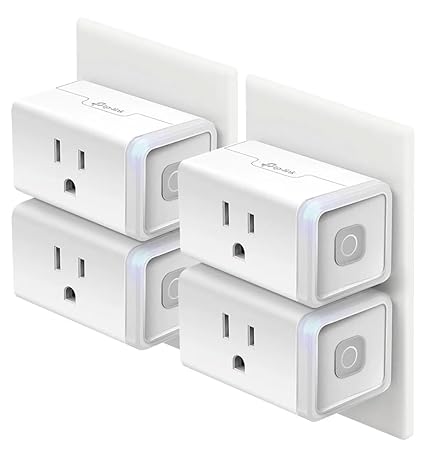
Kasa Smart Plug (TP-Link) Review: My Personal Experience With Smart Home Automation
What Is the Kasa Smart Plug by TP-Link?
The Kasa Smart Plug by TP-Link is a Wi-Fi–enabled smart outlet that lets you control everyday electrical devices remotely using your phone or voice assistant. Instead of replacing bulbs or appliances, you simply plug them into the Kasa Smart Plug and control everything through the Kasa app, Amazon Alexa, or Google Home.
After using these smart plugs extensively throughout my home—especially during the holidays—I can confidently say they are one of the most practical and affordable smart home devices available.
Why You Should Use the Kasa Smart Plug
I originally bought the Kasa Smart Plug 4-pack because it offered excellent value and flexibility. I wanted an easy way to automate lights, save energy, and avoid constantly unplugging devices manually. These plugs quickly proved to be far more useful than expected.
They are ideal if you want simple automation without rewiring, reliable timers for lights and electronics, remote control when you’re away from home, and hands-free voice control.
Setup & Installation Experience
Setting up the Kasa Smart Plug is straightforward. There is a small learning curve the first time, but once you’ve configured one plug, the rest are incredibly easy.
You plug it in, install the Kasa app, connect it to your 2.4GHz Wi-Fi network, and assign it a name and room. I run mine on the same 2.4GHz network as my outdoor plugs and cameras, and they connected quickly without slowing down my internet or affecting other devices.
App Experience & Smart Features
The Kasa app is clean, intuitive, and beginner-friendly. Creating schedules, timers, and automation rules takes only a few taps.
From the app, I can turn devices on or off instantly, set schedules such as on at dusk and off at dawn, and control everything remotely from anywhere. These features have been especially useful for Christmas lights and trees, making bedtime routines effortless.
Voice Control With Alexa & Google Home
Voice control is one of the standout features. The Kasa Smart Plug works flawlessly with Amazon Alexa and Google Home.
I’ve created routines like “Alexa, goodnight” to turn off all lights or “Alexa, let there be light” to turn them on. Google Assistant offers the same level of control, making these plugs compatible with either smart home ecosystem.
Reliability & Connectivity
In daily use, the plugs have been very reliable. They stay connected almost all the time, with only rare and brief disconnections that resolve on their own.
Even if the internet goes down, the plugs retain their schedules and continue operating normally. You can also control them manually using the button on the side. Once the internet is restored, they reconnect automatically.
Indoor & Outdoor Performance
I use Kasa smart plugs throughout my home and outdoors. The weather-resistant outdoor versions work perfectly in rain and varying temperatures. One outdoor plug sits roughly 60–70 feet from the house and still responds instantly.
Even during the holidays, with more than 15 smart plugs, wall switches, outdoor plugs, and dozens of other Wi-Fi devices, my network remains stable with no performance issues.
Energy Savings & Everyday Convenience
One of the biggest benefits has been reduced energy waste. Since I can check and control everything from my phone, I no longer forget to turn lights or devices off. And if I do, I can fix it instantly from anywhere.
Smart Plug vs Smart Bulb
I personally prefer smart plugs over smart bulbs because they’re more versatile. A single plug can control lamps, string lights, fans, and small appliances, giving you flexibility without locking you into a specific bulb type.
Are Kasa Smart Plugs Worth It?
Yes—without hesitation.
The Kasa Smart Plug by TP-Link is affordable, easy to use, highly reliable, and packed with useful automation features. With seamless Alexa and Google Home integration, excellent app control, and dependable performance, these plugs are a smart addition to any home.
For me, they’ve become an essential part of my daily routine—and I would absolutely buy them again.
How to Set Up Kasa TP-Link Smart Plug
-
Plug the smart plug into a wall outlet
-
Download and install the Kasa app (available on iOS and Android)
-
Open the app and create or sign in to your TP-Link account
-
Tap “+” to add a new device
-
Choose Smart Plug → TP-Link Kasa Smart Plug
-
Follow the app instructions to connect it to your 2.4 GHz Wi-Fi network
-
Name the device and assign it to a room
Once setup is complete, you’ll be able to control the plug from the app and set schedules or timers.
How to Setup TP-Link Kasa Smart Plug
Setting up a TP-Link Kasa Smart Plug means connecting it to your Wi-Fi and the Kasa app:
-
Plug the Kasa Smart Plug into a power socket
-
Open the Kasa app on your phone
-
Tap “+” to add device → Smart Plug
-
When prompted, enter your Wi-Fi password
-
Wait for the plug to connect (status light will indicate success)
-
Give it a name and assign it to a room
After this, you can immediately turn devices on/off, create schedules, or integrate with voice assistants.
Can You Connect Kasa Smart Plug to a TP-Link Router?
Yes—you absolutely can!
The Kasa Smart Plug connects via your home Wi-Fi network, so as long as your TP-Link router broadcasts a 2.4 GHz Wi-Fi signal, you can connect the smart plug to it.
Keep in mind:
-
The plug does not connect directly to the router app
-
It needs Wi-Fi internet access and the Kasa app to configure and control
-
Make sure your router’s 2.4 GHz SSID is enabled (many devices don’t support 5 GHz)
Do You Need the Kasa App for TP-Link Smart Plug?
Yes—you need the Kasa app for setup and full control.
The Kasa app allows you to:
-
Connect the smart plug to Wi-Fi
-
Rename and group devices
-
Create schedules and timers
-
Control the plug remotely
-
Integrate with Alexa or Google Assistant
Without the app, the plug won’t connect to your Wi-Fi or be controllable remotely. You can manually press the button on the plug to turn it on/off locally, but for smart features the app is required.
How to Make TP-Link Kasa Smart Plug Remote Access
Remote access lets you control the plug from anywhere (not just when on your home Wi-Fi). Here’s how:
-
Make sure the Kasa Smart Plug is set up in the Kasa app
-
Sign in with your TP-Link ID (email and password)
-
Stay connected to the internet (plug must be online)
-
Use the Kasa app on your phone when away from home
-
You can now turn the plug on/off, change schedules, and check status from anywhere
Remote access works by linking your smart plug to your TP-Link account, so you don’t need to be on the same Wi-Fi network. Simply open the Kasa app, and you’ll see all your devices ready to control.